One finger.
The whole voicing.
A laptop key becomes a real chord, voiced the way a pianist would, and sent straight to your DAW.

- 01 / 05
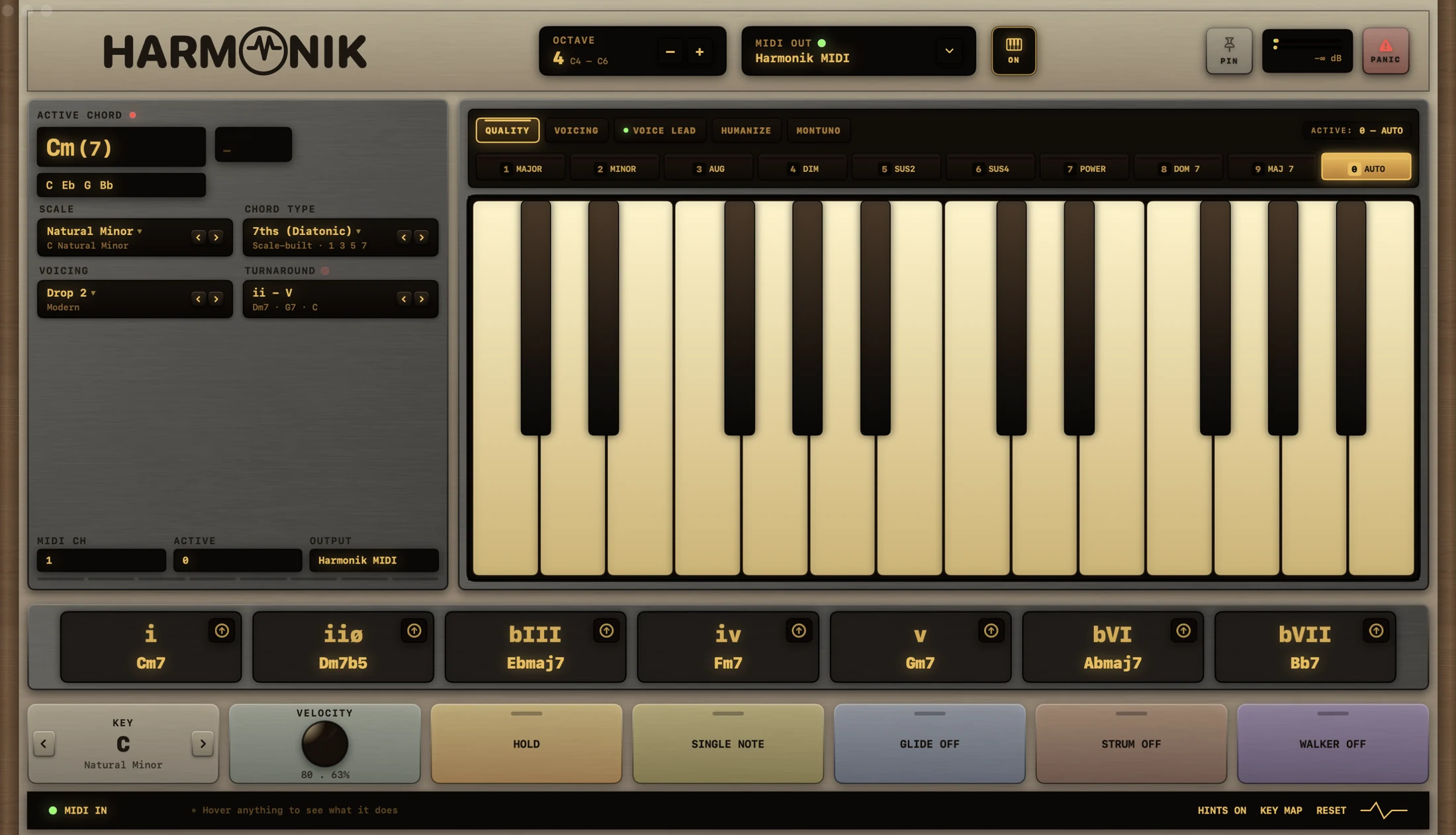
It knows the chord. And it remembers the setup.
The active chord names itself as you hold it, with the notes it is using. A rig saves the whole musical state, and recalls it mid-set without touching your routing.
- 02 / 05
Eight modules. None of them a preset.
Voice lead, humanize, strum, glide, walker, montuno, arp and perform, each switched on where it sits. Move the voicings to guitar and the sixth becomes approach.
- 03 / 05
Ten voicings under the number row.
Close, both inversions, open, drop 2, shell, rootless, double lead, bass plus upper, double bass. Piano or guitar, three banks each, one keystroke away.
- 04 / 05
Seven chords under seven fingers.
The scale you picked, laid across A S D F G H J and named as you play. Or a USB controller, or the pads themselves.
- 05 / 05
Already in your input list.
Harmonik broadcasts itself as a virtual MIDI source the moment it opens. No plugin, no wrapper, no host to crash. REC against the built in click, TAKE to keep it.
Play it before you read about it.
Press A S D FG H J, or tap. These are the app's own chords in C natural minor, drop 2.
Web Audio, in this page. The app sends MIDI, and plays its own piano if you switch that on.
$100once
Lifetime updates. No subscription.
- Platform
- macOS 11 or later. Universal, Apple Silicon and Intel.
- Library
- 26 scales and modes, 36 chord types, 60 voicings across piano and guitar.
- Output
- Harmonik MIDI, broadcast on launch. Optional built in piano.
- Works with
- Logic Pro, Ableton Live, FL Studio, Studio One, Cubase, REAPER, and anything that takes a virtual MIDI input.
- Windows
- In development. Join the list and you will hear when it lands.
- Version
- 1.0 build 10, beta
Currently in beta, and ad hoc signed rather than notarized, so macOS asks you to confirm the first launch. Both change before release. More in the questions below.
Before you buy.
Does Harmonik make sound on its own?
It is a MIDI instrument first: it plays whatever synth or sampler you point it at. There is also a built in piano using macOS's own sound bank, off by default, for playing without opening a DAW.
Is it a plugin?
No. It is a standalone macOS application. It broadcasts itself as a virtual MIDI source called Harmonik MIDI as soon as it opens, so there is no plugin to install, no wrapper, and no host that can take it down with it.
What is a rig?
The whole musical state, saved under a name: key, scale, chord type, voicing, octave, velocity and every module's settings. Recall one in the middle of a set and your routing and audio device stay exactly where they were.
Can I record inside the app?
Yes. REC captures what you play against the built in click, and TAKE keeps it. Useful when the idea arrives before the session is open.
What can I play it with?
The letter keys on your computer keyboard, any USB or Bluetooth MIDI controller, or the chord pads on screen. The space bar works as a sustain pedal, and a real pedal works at the same time. Press⌘K for the full key map.
macOS says it cannot verify the developer.
Expected on the current build. Harmonik is ad hoc signed rather than notarized, so the first launch needs one confirmation: Control-click the app, choose Open, then Open again. If that option is not offered, go to System Settings, Privacy & Security, and choose Open Anyway.
This changes once the app is signed with a paid Apple Developer ID and notarized, before release.
Is there a Windows version?
Not yet. A Windows port is in development and is not available to buy. Join the list and you will hear when it lands.
What does $100 get me?
The macOS application and every future update to it, once, with no subscription. That is the whole commercial arrangement as it stands today. Anything else, such as a seat count or a refund window, is not settled yet, so it is not claimed here.